
The event chair's toolkit
Schedule, alerts, pairings and messages. Built by a driver, with input from many event chairs.
Dynamic Scheduling
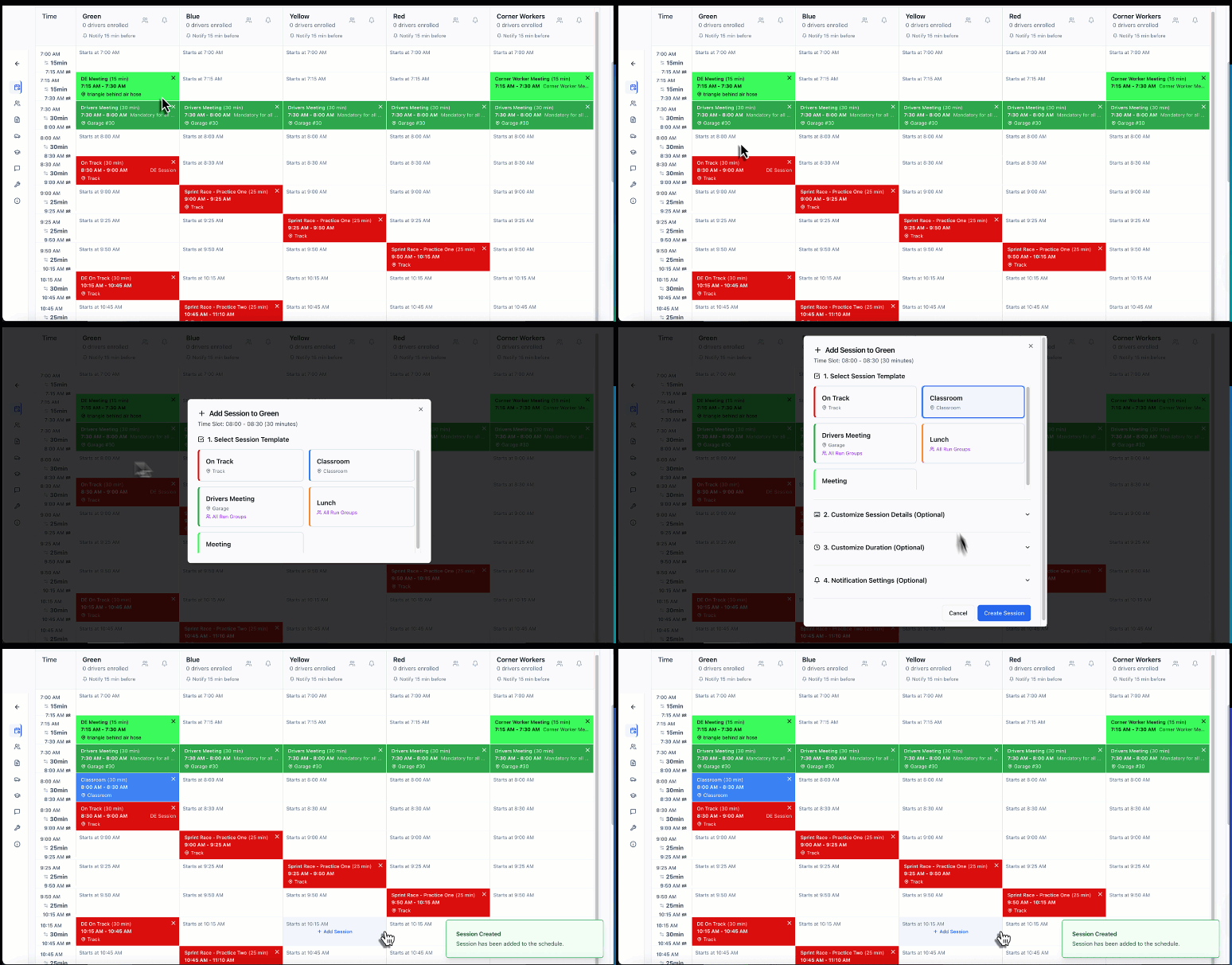
Change it once. Every phone updates.
Build it once: drag, drop, publish. If the track goes cold for 30 minutes, move the sessions and it goes out to every driver's phone within seconds.
Need paper? Track Time Alerts prints a clean, printer-ready schedule for you or any driver, free. It's just out of date the first time a session moves. The one on every phone isn't.
Targeted Comms
The right message to the right group.
Send "Grid now" to the Advanced group. Send "Meeting in 5" to the instructors. Remind one driver they still owe a tech form. Or message the whole paddock. Run groups, instructor groups, individual drivers: it goes out to their lock screens within seconds. Nobody has to catch it over the PA.
“The Track Time Alerts App allows us organizers to easily communicate event updates to participants on a real-time basis.”
Bert X. · HPDE Chair, Niagara PCA
Admin App
Run the event from your pocket.
You're not tied to the laptop in the tower. The Admin app shows who's on track, who's up next and who's done for the day. Send an announcement or an urgent alert to a run group from wherever you're standing, or message one driver directly; urgent alerts use hold-to-send, so nothing goes out by accident. Look up a driver's phone or car in seconds. With Event Glovebox, attach a track map or a photo from the paddock to any message. It's an add-on, $9.99 per event.
Build the schedule on your laptop. Run the day from your phone.
Event Cards
Before the gates open. After the last session.
Publish the schedule and drivers get the details that matter before they leave home: when the gates open, when tech starts the night before, where the drivers meeting is. Put the links and details right in the card, so nobody's digging through last month's email at the gate.
At the end of the day, a card for what's next: BBQ and beverages in the paddock at 5. At the end of the event, a thank-you and the date of your next one, while the weekend is still fresh, which is when people sign up for the next one.
Instructors & Students
Every student knows their instructor. Every instructor knows their students.
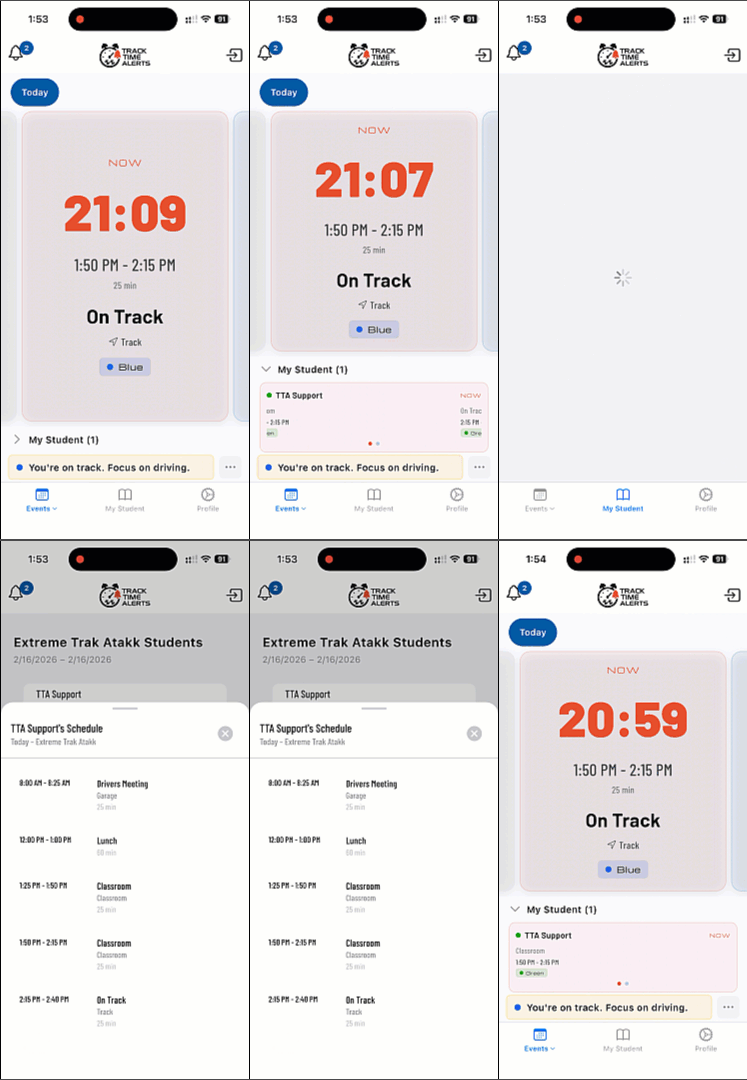
Between sessions, instructors spend a lot of time finding their students and answering “when are we up?” Track Time Alerts takes care of both. Pair them once in the scheduler. Students see their instructor's photo, car, car number and phone. Instructors see the same for every student, plus each student's schedule and run group, and they get the schedule updates. Nobody walks the grid looking for “the blue Cayman, I think.” They're looking for car 42.
“My students and instructors stopped asking me when they were up.” Rich D., Chief Instructor, Niagara PCA
Driver Onboarding
Every driver signed up. No help desk required.
Built by drivers, for drivers, so it's simple on purpose. Import your roster and Track Time Alerts takes it from there: every driver gets a welcome email with how to sign in, and anyone who hasn't finished gets a reminder, so you don't have to send it.
Everything after that is self-service. Drivers sign themselves up and reset their own password. For the driver who didn't read a single email, the registration desk finds their name and shows a QR code. They scan it with their phone, set a password, and they're in before they've finished their coffee.
Track Time Alerts doesn't add an IT department to your event. It takes work off the registration desk.
A club's first event with Track Time Alerts, typically:
80–85% of drivers signed in before the event
95%+ by the end of it
Most of the rest sign up at check-in, usually when a friend shows them the app.
Event Glovebox · Add-on
Every document in one place.
The supp that changed on Thursday night. The tech form. The track map with the paddock layout. The waiver. Your classroom slides. Upload them once and every driver in your event has them in the app, in one place. Change a document and upload the new version: that's the one they see. When you publish the schedule, the email lists every document with your note.
It works in your broadcasts too. Attach a photo or a PDF to any message: the communication cable someone left at the grid, the exercises for this afternoon's instructor session, the grid placement for the next group.
Event Glovebox is an add-on, $9.99 per event. Add it at checkout or any time after.
What your drivers see.
No manual needed.


Built specifically as an HPDE communication system, for track days, autocross and club racing.
Already using MotorsportReg or ClubReg for registration? Keep them. Import your roster in a few clicks and we handle event-day alerts.
Run your first event free.
Full access, no credit card, no subscription.
We'll set up your first event with you, start to finish. I'm Andy, I built Track Time Alerts, and I answer the phone on event day. Plan on about an hour for that first event. After that, about 15 minutes, because you reuse the grid. That's about as long as building it in Excel, with the conflict checking done for you.